
Step 1 of 3 · Generate · free
Free ATS Resume Builder: Create an ATS-Friendly Resume Online
Build an ATS-friendly resume or CV free. Start from scratch or upload yours, preview it, and download it as plain text at no cost (a quick Google sign-in saves your file). PDF and Word, designs, editing and AI rewrites are an optional upgrade. No subscription.
- No subscription: Build and preview free, free text download with a Google sign-in, no recurring charges.
- Won't fabricate: AI rephrases your real facts; it never invents experience.
- Private by default: Your resume is processed to build the draft and never stored.
How do you want to start?
Switching to a new career? Build a career-change resume
How the ATS resume builder works
- 1
Start free
Upload your existing PDF or Word resume, or build one from scratch. Choose your target role and experience level to create a tailored starting point. Most resumes take 5–10 minutes to build.
- 2
Edit with AI or by hand
Unlock editing ($5.99 once) to change any section yourself, with up to 10 AI-assisted suggestions per resume to improve your summary, experience, or skills. Your facts stay yours — the AI helps improve the wording, not invent information.
- 3
Preview before you download
Build and preview your finished ATS-friendly resume for free. Download it free as plain text, or unlock PDF and Word in four designs, editing and AI rewrites for $5.99, one-time. No subscription.
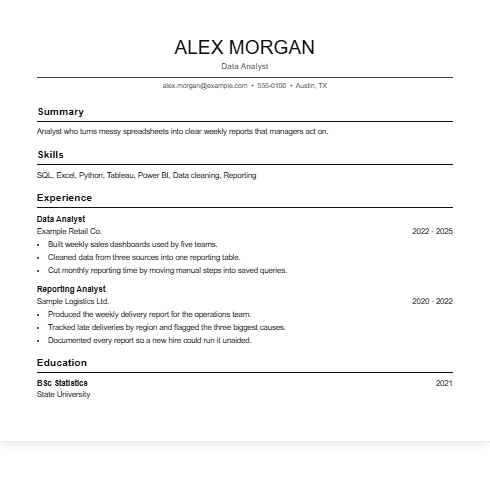
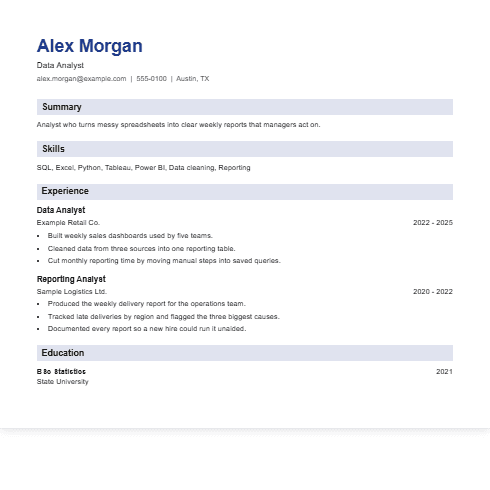
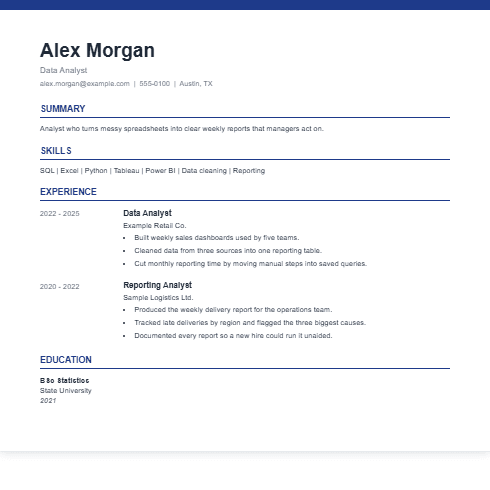
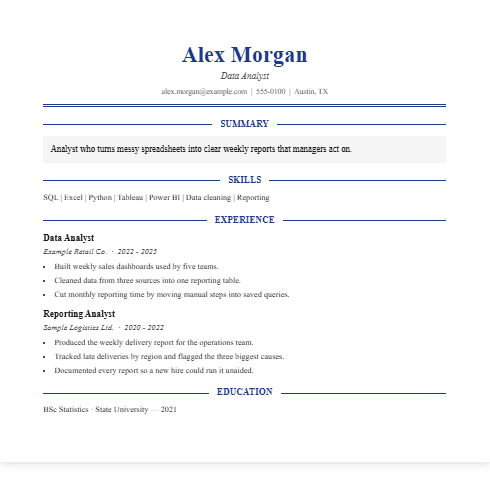
Pick a design for your ATS-friendly resume
Every design keeps one column and plain text, so an applicant tracking system reads it the same way. All four, in seven colours, download as PDF or Word with the upgrade; the plain text file is free. Shown here with sample content.
What the builder formats for you
Every resume comes out in a structure that hiring software can read cleanly, whatever you write and whichever AI suggestions you accept:
- Standard section headings such as Summary, Skills, Experience and Education that applicant tracking systems recognise
- A clean single-column layout with no columns, text boxes or graphics
- Readable fonts such as Arial, Calibri or Times New Roman, and consistent job titles and dates
- Selectable text in the finished file, never a picture of a resume
A modern or a traditional look is a style choice. Both work as long as the structure stays this simple, so pick the one that suits your field. Want the reasoning? Read how to make a resume ATS-friendly, step by step, the ATS formatting rules or the guide to resume sections and headings. Prefer a blank file to type into? Download a free ATS resume template. To test a resume you already have, use the free ATS resume checker.
No resume builder can promise a particular ATS score or outcome, because each employer sets its own screening rules. What you control is the structure and formatting of the document.
80 is the median ATS score across the real resumes people have run through our analyzer. Most of the lost points are structural, which is the part this builder gets right by default. See all 3,442 analyses →
What the AI changes, and what it won't
ResumeAtlas uses AI-assisted editing to improve the wording of your existing resume without inventing experience, responsibilities, or results. Here's what that looks like on one work-experience bullet. This is an illustrative example, not a real customer's resume.
What you write
Responsible for the onboarding flow. Worked with design and backend to fix drop-off issues and improve the signup experience.
What AI Improve returns
- Owned the redesign of the user onboarding flow, partnering with design and backend engineering to diagnose and resolve signup drop-off.
- Cut signup abandonment by [Add %] by reworking the highest-drop step identified in the flow analysis.
- Kept:
- Every fact: the onboarding flow, the two teams involved, the drop-off problem, and the signup context.
- Added:
- Nothing. Only stronger verbs and clearer scope for facts that were already there. See resume action verbs you can use.
- Refused to guess:
- The result. A drop-off fix is worth quantifying, but no number was supplied — so the bullet carries an [Add %] prompt instead of a plausible invention you would have to defend in an interview.
Which file should you send: PDF, Word or text?
All of them work with applicant tracking systems as long as the text stays selectable. Here the plain text file is free after a Google sign-in. PDF and Word come with the one-time upgrade.
- Word (.docx): the most common choice, opens in most applicant tracking systems and is easy to edit after download. Part of the upgrade.
- PDF: also widely accepted, and keeps the layout fixed if you email it to a recruiter or share it on LinkedIn. Part of the upgrade.
- Plain text (.txt): free here after a Google sign-in. No formatting at all, so it pastes cleanly into application forms that ask for text.
- Google Docs: easy to edit and share, but download it as Word or PDF before you submit to an ATS so the formatting holds.
Is the ATS resume builder free?
What you can do free
Build a resume from scratch or from a file you already have, preview it, and download it as a plain text file after a Google sign-in. No subscription, and nothing to cancel.
What the $5.99 upgrade adds
One payment for that resume unlocks PDF and Word files in all four designs and seven colours, editing every field, and up to 10 AI rewrites. A new resume is a new purchase. Nothing recurs.
Do you need to sign in?
Not to build or preview. A quick Google sign-in is needed to download, including the free text file, and to unlock editing and AI.
| Typical resume builders | ResumeAtlas | |
|---|---|---|
| Build & edit | Often free until download | Free |
| AI-assisted editing | May require a paid plan | Included in the one-time $5.99 unlock (up to 10 per resume) |
| Preview | May be limited | Free |
| Signup to start | Often required | No signup required |
| Download | Often tied to a subscription | One-time payment |
| Recurring billing | Common | None |
| Your resume file | May be uploaded to servers | Parsed in your browser |
| AI suggestions | Can generate generic content | Based on your existing facts |
| Formats | May vary by plan | PDF & Word included |
Resume or CV? One ATS builder for both
Whether you call it a resume or a CV depends on where you apply. In the US and Canada the one-to-two page job application document is a resume. In the UK, Ireland, India and many other markets the same document is a CV. Applicant tracking systems such as Workday, Greenhouse, Lever and Taleo read structure, not vocabulary, so the same single-column layout, standard headings and consistent dates serve both. This works as an ATS resume builder and as a free ATS CV maker.
One real exception: an academic CV with publications, grants, conferences and teaching history is a different format. This builder is made for the professional resume or CV that goes through an ATS, so it is the wrong tool for an academic CV.
Making a CV, or fixing one you already have?
- Making a new CV: you are in the right place. Write it here, section by section.
- You already have a CV and it just needs the layout fixed: convert your CV to ATS format instead. It rebuilds the file you have rather than starting over.
- You want a blank file to type into: download a free ATS-friendly CV template in Word or Google Docs and fill it in yourself.
Who is this ATS resume builder for?
Freshers and first jobs
Pick the entry level and your target role, add the little experience you have, and the builder drafts a role-targeted starting point. Anything it cannot know, such as a result you never measured, is flagged for you to fill in instead of invented. Not sure what a strong one looks like? Browse resume examples by role.
Experienced professionals
Upload your current resume and keep your facts. AI rewrites a bullet or your summary only when you ask. For one line at a time, the free resume bullet generator and professional summary generator work on their own.
Changing fields, not just jobs?
Same builder, set up for a move between fields: it rewrites the experience you already have in the target role's language, and marks what your background genuinely doesn't cover instead of inventing it.
Career change resume builder — any field, any target role →Resume builders by role
Open the builder preconfigured for your role — each is tuned to the skills, sections, and ATS keywords that matter for that job.
- Software Engineer resume builder →
- Data Scientist resume builder →
- Data Analyst resume builder →
- Machine Learning Engineer resume builder →
- AI Engineer resume builder →
- Business Analyst resume builder →
- AI Product Manager resume builder →
- Product Manager resume builder →
- Forward Deployed Engineer resume builder →
ATS resume builder FAQ
- What is an ATS (Applicant Tracking System)?
- An Applicant Tracking System, or ATS, is software that companies and recruiters use to collect, scan, and filter job applications. It reads your resume to extract key information such as job titles, work dates, education, and skills, then searches or filters by criteria the hiring team specified. An ATS-friendly resume is structured so this software can read it correctly—using clear headings, a simple layout, and readable text—rather than relying on design elements like columns or graphics that parsing software can't interpret.
- Is this AI resume builder free?
- Yes. You can build and preview your resume for free, and download it free as a plain text file after a Google sign-in. An optional one-time upgrade adds PDF and Word files, four designs, editing and AI rewrites. There are no subscriptions or recurring charges.
- Do I need to sign up to use the AI resume builder?
- No. You can start building and previewing without creating an account or paying upfront. A Google sign-in is only required to download a file or to unlock editing and AI.
- Can I edit my resume manually after using AI?
- Yes. You can generate content with AI or write everything yourself. Every section of your resume can be edited manually at any time.
- Does this AI resume builder create ATS-friendly resumes?
- Yes. Every resume is built using ATS-friendly formatting with clear section headings, readable fonts, and layouts designed to work with most Applicant Tracking Systems.
- Does the AI invent work experience or skills?
- No. The AI helps improve wording, grammar, and formatting based on the information you provide. It does not fabricate work experience, achievements, or qualifications.
- Can I upload my existing resume?
- Yes. Upload your existing resume to continue editing, improve the content with AI, or update it with a modern ATS-friendly layout.
- Can I start a resume from scratch?
- Yes. You can create a new resume from a blank template and build every section using AI assistance or manual editing.
- Can I download my resume as a Word or PDF file?
- Yes, with the one-time $5.99 upgrade for that resume: PDF and Word files in any of four designs and seven colours, plus editing and AI rewrites. After a quick Google sign-in the plain text file is free.
- How should I format the skills section for an ATS resume?
- Keep it plain text: a simple list or comma-separated line, grouped by category if you have more than a handful, with no icons, progress bars, star ratings, or tables. Those visual extras are exactly what a parser can't extract—a five-star graphic next to Excel reads as nothing at all, not as a skill. Use the same capitalization every time a skill repeats elsewhere on the page, since inconsistent casing can register as two different terms. This builder formats the skills section this way by default.
- Do ATS-friendly resumes actually exist, or is that a myth?
- Both things are true at once. It's a myth that a robot is auto-rejecting your resume for using the wrong font or missing a magic keyword count—most applicant tracking systems don't work that way. What's real is the underlying mechanism: software parses your resume into fields before a person ever searches or filters it, and a two-column layout or a table can genuinely scramble those fields regardless of what the recruiter intended. So the debate over the word friendly doesn't change whether your information survives being read. This builder produces that structure automatically, whichever side of the debate you land on.
- Should I keep two versions of my resume—one ATS-friendly, one designed?
- No, and keeping two is usually where things go wrong: they drift out of sync, or a recruiter gets sent the wrong one. A single-column, well-typeset resume with clear headings is not a downgrade from a designed one—it is simply the version that also survives being read by software. This builder is built around that idea: the output is the ATS-safe structure and it still looks like a document a person put real thought into, not a compromise you send only when you have to.
- What do I get free, and what does the upgrade add?
- Free: build your resume, get a role-targeted draft, and preview it with no account and no card, then download a plain text copy after a Google sign-in. The one-time $5.99 upgrade for that resume adds PDF and Word files in all four designs and seven colours, editing of every field, and up to 10 AI improvements. No subscription, no trial that turns into one, nothing to cancel. A new resume is a new purchase.
Need AI help with just one bullet point? Try the free resume bullet generator.
Already have a resume? Check its ATS compatibility with the free ATS resume checker.
See how this is tested and what we refuse to claim in our methodology.
Not sure where to start? Browse resume examples by role for inspiration first.
Prefer a blank file to fill in yourself instead? Download a free ATS-friendly resume template, or start from the well-known Harvard resume template.
For the mechanics behind this, see the full list of ATS rejection reasons.
Want the free-download route instead? Take a blank ATS resume template.
Your resume is built. Now match it to specific jobs.
Paste your finished resume and a job description for a match score, Application Verdict, and the exact keywords the posting screens on, free, before you apply.
Match resume to job description, freeFree · no signup · Application Verdict in seconds