
Match your resume to any job description · Find missing skills · Free · No signup
Compare Your Resume to Job Description — Get Your Match Score Free
Does your resume match this job description — and how well? Compare them here — free, no signup — and get your match score, the specific skills you're missing, and actionable fixes. Then tailor the gaps and download your optimized resume as PDF or Word; your first 2 ATS-friendly resume workflows, optimized for the job role, each calendar month are free.
Your application report generates here
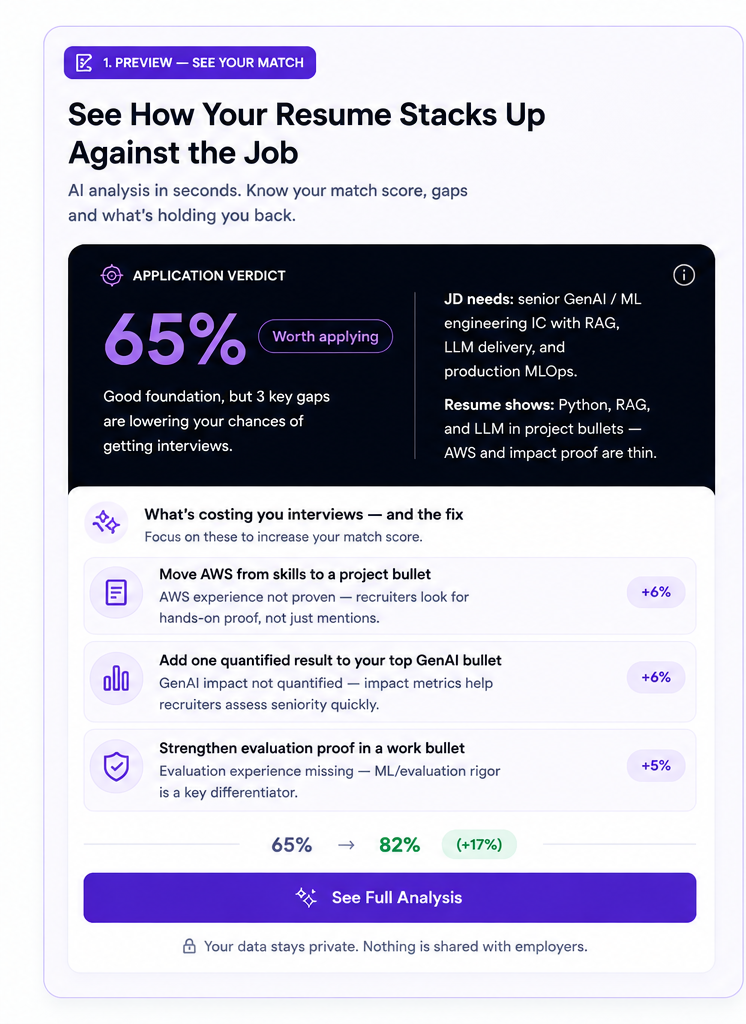
Upload or paste your resume and the job description on the left, then see your application verdict and what may eliminate you.
Needing a fix before you apply is normal, not a red flag. Across 1,292 real resume-to-job-description comparisons that recorded a verdict (June 2026 – October 2026), only 33.4% needed zero changes to apply — most got a short fix list, a few got pointed at a different posting instead. See the full data ↓
Your Resume Match Results
Compare your resume to the job description and see whether you're a match before you apply. You'll get your application verdict, resume match score, missing skills, rejection risks, and the requirements your experience actually proves.
- Resume Match Score — A percentage showing how closely your actual experience matches this job's requirements.
- Missing Skills & Keywords — The exact skills and terms this job asks for that your resume doesn't show yet.
- Should You Apply? — Whether your fit is strong enough to apply now, optimize your resume first, or look for a better match.
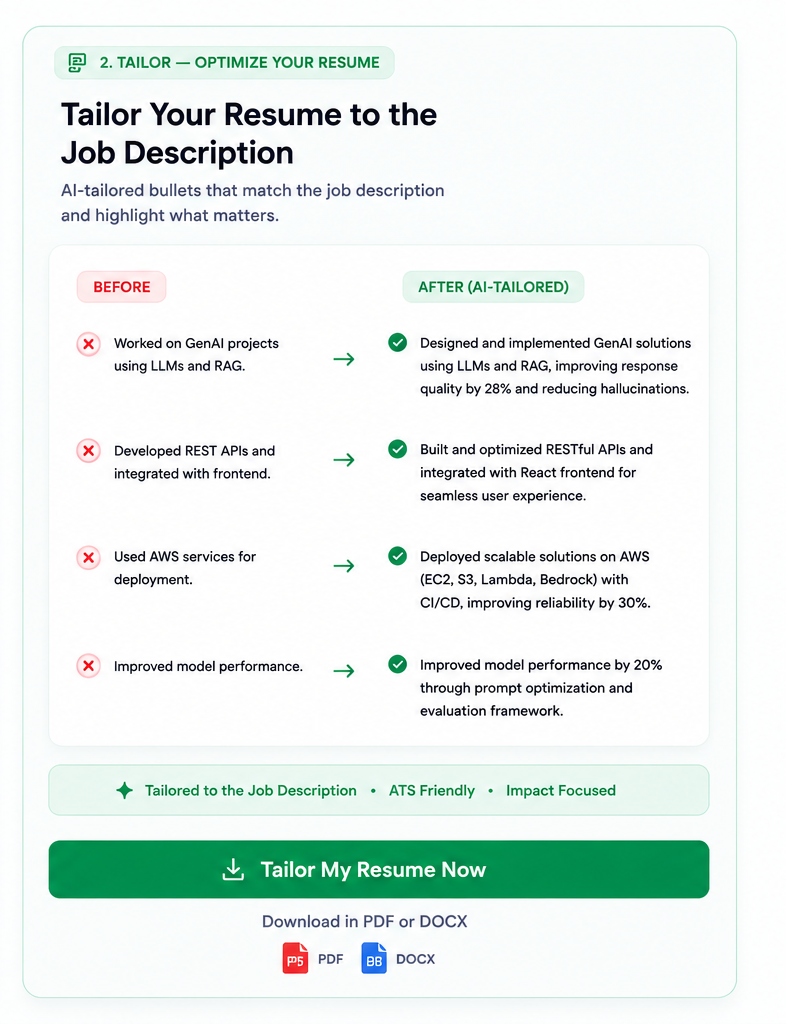
- Job-Specific Optimization — Rewrite the weak spots, edit anything by hand, then download a version built for this job — PDF or DOCX.
Compare → fix → download
Optimize Resume for Job Description
After you compare your resume to the job description, ResumeAtlas identifies the gaps you can genuinely fix. Select the recommendations you want, review the changes, and create a job-specific resume without rebuilding everything from scratch.
- 1Paste both: your resume and the job description.
- 2Review your match: see missing requirements, weak evidence, and rejection risks.
- 3Pick the fixes: choose only improvements supported by your real experience.
- 4Edit and download: review every change, then export as PDF or DOCX.
✓ Free optimize — no login✓ Selected fixes only✓ First download free
What You'll See in Your Match Report
| Problem | What ResumeAtlas does |
|---|---|
| Not a match to the role | Shows your match score so you know whether the role is worth applying for. |
| Required skills missing | Finds the specific requirements the job asks for that your resume does not demonstrate. |
| Skills listed but not proven | Separates skills listed in your Skills section from skills supported by work or project experience — one of the more common reasons applications get filtered out. |
Compare resume to job description free. No signup required.
Apply-readiness intelligence
Keyword checkers tell you what's missing. We tell you whether to apply.
Jobscan, Resume Worded, and ATS checkers score keywords. ResumeAtlas gives you the apply decision — verdict, risks, and fixes — before you submit.
Resume Matching vs Keyword Matching
Most tools ask “Is this keyword in the resume?” ResumeAtlas asks “Where is the evidence that you actually did this?”
Job requirement
AWS
Proven
AWS deployment described in a project bullet
Weak
AWS mentioned, but no scope or outcome
Listed Only
AWS appears only in Skills
Missing
No evidence found
ResumeAtlas uses this evidence to calculate your match score and pick only the fixes your experience can support.
| Keyword checkers | ResumeAtlas | |
|---|---|---|
| What they tell you | Keyword match percentage | Application verdict + shortlist odds |
| Why you get rejected | Missing keywords | Missing proof in your bullets |
| What they optimize | Keyword density, generic rewrites | Demonstrated experience for this posting |
| Fixes applied | All at once, without your consent | Only what you select — nothing fabricated |
| First scan cost | Signup required | Free, no signup |
Just want the rewrites? Tailor your resume to this job description line by line
All the tools, ranked: best ATS resume tools compared
Detailed comparisons: vs Jobscan · vs Resume Worded · vs Teal · vs Enhancv · vs Kickresume
Resume not getting interviews — why skills on paper still get filtered out.
Compare Resume to Job Description
ResumeAtlas is a resume to job description match checker: paste your resume and the full job posting into the tool above — a job description and a job posting are the same document here, so either word works, and a JD is just the job description written short, so the scoring is identical either way. In under a minute you get a resume match score, application verdict, role fit score, proven and weak skills, missing requirements, and job-specific recommendations. Two resumes with identical skills lists can still score differently, because it's evidence in your bullets that counts, not the list itself. For the best comparison, paste the requirements section from the posting rather than company boilerplate — most jobs are published through applicant tracking systems such as Workday, Taleo, Oracle Recruiting Cloud, Greenhouse, Lever, iCIMS, SAP SuccessFactors, but this tool evaluates the employer's stated requirements rather than testing whether your resume can be parsed by those systems. If you are unsure whether your resume can be read correctly, run the ATS Resume Parser first, or convert your resume to ATS format if formatting is getting in the way.
Check Resume Against Job Posting or Job Description
Paste either document type into the same field — ResumeAtlas scores what that specific posting asked for, not what resumes generally contain.
Check CV Against Job Description
No separate setting to choose — paste a CV the same way you would a resume. The FAQ below covers when the two words differ and the one document type this checker is not built for.
Example: listed but not proven (illustrative, not a real analysis)
Before
Kubernetes listed in skills — no project bullet shows where you used it.
After analysis
Kubernetes marked as weak because no project bullet demonstrates Kubernetes usage for this posting.
Recommended fix
Add Kubernetes deployment project evidence — scope, stack, and outcome — in a work or project bullet where you actually used it.
How to read a job description for hidden requirements
Most job descriptions list 50+ responsibilities and requirements, but only 3-5 are true deal-breakers. Recruiters know this; most postings are written to cast a wide net. Your job is to identify which gaps are real blockers versus which ones are nice-to-haves that won't cost you the role.
Start with the requirements section at the top of the posting—that is where must-haves live. Then look for repeated themes: if "React" appears three times (in requirements, job description, and preferred skills), it is core. If a requirement appears once in a bulleted list of fifteen, it is exploratory. Scan your own resume for the repeated themes first, and if you land 70%+ of those, the one-off gaps are probably fixable. To pull the required and preferred keywords out of a posting before you compare it with your resume, use the job description keyword scanner, or follow the guide to find the keywords in a job description by hand.
Watch for qualifiers: "preferred" and "nice-to-have" are not deal-breakers, but "required" and "must have" are. If the posting says "5 years required" and you have 4, it depends on context—a strong fit on every other requirement might still land you an interview. This matcher shows you exactly which requirements you demonstrate with real experience versus which ones you just list, so you can decide whether the real gaps are fixable or disqualifying. For a measured answer to how many requirements you need to meet, see the data from real postings.
Role-specific language: translating your resume to their posting
The same job title can mean completely different things depending on the company and industry. A "Product Manager" at a startup that is early-stage might focus on user discovery and feature validation, while the same title at a Fortune 500 means roadmap planning for a mature product. A "Data Analyst" at a fintech company prioritizes risk and compliance, while at a SaaS company it is retention and engagement metrics.
This matters for your resume because a company keyword-scans for specific skill names, not role concepts. If this posting calls it "ETL pipeline" and your resume says "data pipeline," the scanner might miss the match. If they say "full-stack" and you listed "frontend + backend," same problem. This matcher flags those gaps by comparing your actual skills—not the words you chose, but the experience you demonstrated—against the exact terms this posting uses.
Before you apply, scan the job description for language unique to that company: unusual job titles for common roles, specific tool names, domain vocabulary (e.g., "ETL" vs "data pipeline," "MQL" vs "lead," "incident" vs "alert"). If those terms appear in their job description and nowhere on your resume, that is your gap. This matcher will show you those language mismatches so you can tailor your bullets to speak their language without inventing false experience.
Red flags: when your resume match score says "don't apply"
This matcher gives you three verdicts: Apply, Optimize First, or Skip. The verdict is based on how many core requirements you actually demonstrate, not how many words overlap. A low match score is valuable data: it tells you whether this role is a real fit or whether you would be wasting your time.
If your match score is below 60% and most of that gap is in must-have requirements you do not have, this is your permission slip to skip it. Interview odds drop sharply when you are missing proven experience in core requirements. Recruiters screen for these first, and no cover letter will fix a resume that does not show the skills the role demands. Applying anyway means your resume gets rejected before a person ever reads it.
A score of 60–75% with gaps concentrated in "nice-to-have" or "preferred" categories means Optimize First: tailor your existing bullets to emphasize what you do have. A score above 75% and most gaps are vocabulary mismatches (the tool shows you which) means Apply with confidence, and use the suggestions to strengthen your resume before you submit. This matcher is built on data from 100,000+ analyses—the verdict it gives you is based on what actually predicts interview success, not on a generic keyword count.
Unsure what the number means? See what counts as a good match score, or read when it is worth it to apply even if it's not a full match.
How ResumeAtlas Verifies and Optimizes Your Resume
How to tailor your resume to this job description:
- Rewrite your professional summary for the target role.
- Move supported skills from the Skills section into experience bullets.
- Strengthen weak evidence with measurable scope and outcomes.
- Apply only the improvements you choose to make.
- Review every change, then export the tailored version as PDF or DOCX.
How a selected fix reaches your resume:
Each rejection risk you tick is resolved inside the experience you already have, not added as a new line. The tool finds the role or project where you did the closest work, then rewrites that existing bullet so the missing requirement becomes explicit in it — naming the tool, the scope, and the outcome that were always implied but never stated. A requirement flagged as listed-only moves into the bullet that proves it. A requirement flagged as weak gets the measurable detail it was missing.
That is why the optimized resume still reads as yours and still holds up in an interview: every strengthened line points at work you actually did. If there is no experience to attach a requirement to, the tool leaves it as a gap rather than writing one for you. Nothing is generated that you cannot support with real experience — honest tailoring stops well short of fabrication, and this tool is built to stay on the honest side of that line. Unsupported requirements remain visible so your resume stays accurate and interview-ready.
Use it as a resume optimizer
If you searched for a resume optimizer or an ATS resume optimizer, this is the tool. Paste the resume you already have and the job you want. You get a match score, the keywords the posting asks for that your resume does not show, an Apply, Optimize First or Skip verdict, and the fixes ranked by how much each one matters. Tick the fixes you want and it rewrites those bullets for that posting, using work you actually did. All of that is free with no signup; the only paid step is downloading the finished file. There is no separate optimizer tool on ResumeAtlas. This page is it.
Resume match checker vs ATS resume checker:
A resume match checker scores one resume against one posting, which is what this page does. Use it as a resume checker with job description whenever you have a specific role in view, or as an ATS resume checker against job description when the question is what that employer asked for and whether your bullets evidenced it. What it will not tell you is whether your file can be read correctly before any posting exists. That is the ATS Resume Parser's job, and it is a different question. If you are already scoring well there but still not hearing back, the gap is usually somewhere else — see why a high ATS score still gets no interviews.
| What you need | Use |
|---|---|
| Check resume against job description | This tool |
| Compare resume to job posting | This tool |
| Resume match score for one posting | This tool |
| Application verdict — should I apply? | This tool |
| Keywords for a role, no posting yet | Resume Keyword Scanner |
| Will my file be read correctly? | ATS Resume Parser |
| Write a resume from scratch | ATS Resume Builder |
| Rewrite bullets to cover the requirements | Work Experience Bullet Generator |
| Write a summary aimed at this posting | Professional Summary Generator |
| Move into a different role or industry | Career Change Resume Builder |
If you do not have a specific job description yet, use the scan your resume for keywords to benchmark your resume against common requirements for your role before returning here to compare it with an individual posting.
ResumeAtlas insights
ResumeAtlas Insights From 2,378 Resume-to-Job Description Comparisons
Every figure below comes from analyses actually run on this tool between March 2026 – October 2026, not from a survey or an industry report. Each carries its own sample size because the fields were added at different times and do not all cover the same rows.
80%
Median match score2,378 analyses
66.5%
Not ready to send as-is1,292 with a verdict
4
Skills claimed without proof1,245 analyses
What the Data Says About Resume Matching
Most resumes are not ready to send as-is
- 33.4%Apply as-is (432 of 1,292) — median estimated shortlist odds 72%
- 48.2%Optimise first (623 of 1,292) — median estimated shortlist odds 42%
- 18.3%Skip this posting (237 of 1,292) — median estimated shortlist odds 12%
About these statistics
Across 1,292 analyses that recorded a verdict (2026-06-19 to 2026-10-05), 66.5% came back as either “optimise first” or “skip this posting”. Only 33.4% were judged ready to apply without changes.
Shortlist odds are this tool's estimate for that specific posting at the time of the analysis. They are not observed hiring outcomes and no interview results are tracked.
The median resume claims 4 skills it cannot prove
Across 1,245 analyses that scored proof strength, the median resume listed 4 skills that appear somewhere in the document but are never demonstrated in a work or project bullet. Those are the ones that read as padding to a recruiter and score as weak here.
Want to know how all 2,378 resumes performed? The full dataset covers the widest category gap, the skills postings ask for that resumes most often lack, required versus preferred requirements, and the experience gap.
Read the full ResumeAtlas Insights report →How these numbers are produced
Figures are aggregated from resume-to-job-description analyses run on this tool between March 2026 – October 2026, snapshotted at build time and refreshed on each deploy. Individual resumes and job descriptions are never published, and anonymous sessions are discarded after the analysis runs. Sample sizes differ per figure and are stated beside each one. These are resume-vs-job-description analyses run on ResumeAtlas, not a survey of all resumes. The sample skews toward software, data and engineering roles, so the specific tools below reflect those postings more than hiring overall. See the full dataset from all 2,378 analyses →
How posting-fit scoring works (Gates A–D)
When you compare resume to job description here, ResumeAtlas scores fit through four gates in sequence. Each gate answers a different question, so resume gap analysis separates parsing problems from keyword gaps from weak evidence.
Gate A
Gate A - Parse hygiene
Whether text, headings, and bullets extract cleanly before match scoring. Distinct from keyword fit.
Gate B
Gate B - Posting vocabulary & required skill debt
Coverage of posting vocabulary and hard requirements missing or weakly evidenced in your resume.
Gate C
Gate C - Semantic fit & evidence density
Whether responsibilities read like the role and bullets carry outcome proof recruiters skim first.
Gate D
Gate D - Skim friction & truth envelope
Whether a recruiter can extract role and impact quickly, and claims stay interview-defensible.
Gate B drives most resume gap analysis (missing resume keywords and skill gap analysis). Gate A overlaps with the free ATS resume parser. Full scoring philosophy: methodology.
Common questions
Compare Resume to Job Description — Frequently Asked Questions
How the match score, application verdict, and optimization actually work — read every answer here, no signup needed.
Running a comparison
How do I check my resume against a job description?
Paste your resume and the full job description into ResumeAtlas. This checks and compares your experience against that specific posting, then returns a resume match score, application verdict, proven and missing requirements, rejection risks, and recommended fixes before you apply. If what you want is to check resume score against job description specifically, the score appears at the top of the result next to the verdict, scored against that one posting rather than against resumes in general. Re-run it after you edit to see which changes actually moved it.
How do I compare my CV against a job description?
You can compare your CV with a job description or check your CV against a JD in the same two fields. ResumeAtlas analyzes a CV and a resume identically, then shows your resume match score, application verdict, skill proof, missing requirements, and the changes worth making for that posting.
How do I compare my resume to a job posting?
Copy the full job posting text, not a summary, and paste it with your resume into the tool above. The resume job description comparison then runs against the posting's stated requirements and returns a side-by-side view: the requirements you prove, the ones you only mention, the ones sitting unsupported in your Skills list, and the ones you do not currently meet, along with an application verdict and optimization priorities.
How do I match my resume to a job description?
Paste your resume and the posting into the two fields above to match your resume to a job description in about a minute — the same fields work whether you think of it as matching your resume with a job posting, or comparing a job and your resume side by side. The match is scored on evidence rather than word overlap: each requirement in the posting is graded by how strongly your bullets support it, from demonstrated with scope and outcome down to absent. A resume job description match therefore rewards moving a skill out of your Skills list and into the role where you actually used it, not repeating the posting's wording back at it. This scores one posting at a time, not a search across open jobs.
How do I do a resume JD match?
A resume JD match is the same task as a resume to job description comparison, just written in the shorter form recruiters use. Paste the JD in one field and your resume in the other. You can run a resume JD match, a JD and CV match, or a CV to job description match here and the scoring is identical, because the tool reads a CV and a resume the same way and treats a JD and a job posting as the same document.
Can I check my resume against a JD for free?
Yes. Check resume against job description free, with no account and no card: you get the full result, not a teaser. If you want to check my resume against job description before an application deadline, the analysis has no signup. What you see for free is the complete resume match score, application verdict, missing requirements, rejection risks, and recommended fixes — and the job-specific optimization. You get 2 free ATS-friendly resume workflows every calendar month, each optimized for the job role, free after Google sign-in; after that, 5 workflows for $4.99.
Is a CV the same as a resume when comparing against a job description?
For this tool, yes. Outside the US the two words are used interchangeably for the same one-to-two-page professional document, and an ATS extracts contact details, work history, skills, and education from either one identically — so a CV-to-job-description comparison and a resume-to-job-description comparison return the same analysis. The exception is the academic CV: multi-page publication, grant, and teaching lists are not what job-posting matching is built for, and most academic applications are not screened by an ATS at all.
How much does it cost?
The comparison is free with no signup — match score, missing keywords, application verdict, rejection risks and recommended fixes — and the job-specific optimization. You get 2 free ATS-friendly resume workflows every calendar month, each optimized for the job role, free after signing in with Google. After that, $4.99 buys 5 workflow credits, and each credit is one more workflow for one posting: analysis, optimization and the ATS-friendly PDF or DOCX. There is no subscription and no recurring charge, so nothing renews and there is nothing to cancel. You are never asked for a card to start: your first 2 workflows each month need no payment.
What file formats can I upload?
PDF, Word (.docx) and plain text (.txt), or you can paste your resume straight into the box instead of uploading anything. The job description is always pasted as text, since postings are usually copied from a careers page or a job board rather than downloaded as a file. Text is extracted from the file in your browser, so the file itself is never uploaded; the extracted text of your resume and the job description is then sent to ResumeAtlas to be analyzed.
Can I compare my resume against multiple job descriptions?
Yes, but one posting at a time, and that is deliberate. The whole method is scoring your resume against a single set of stated requirements, so averaging several postings together would blur exactly the detail that makes the verdict useful. Run one comparison, read the verdict, then paste the next posting. Each run is a separate, free analysis.
What should I paste for the most accurate comparison?
Paste the requirements section in full, and skip the company boilerplate. Sections headed responsibilities, requirements, qualifications or what you will do carry the terms the comparison scores against; mission statements, benefits and culture copy add words without adding requirements and will dilute the result. Include the seniority line if the posting has one, because years of experience and scope are graded too. On your side, paste the whole resume rather than a summary, since a requirement only counts as proven when a work or project bullet shows where you did the work.
Scores and how they work
Does my resume match the job description?
Paste the resume and the posting above and you get the answer as a number and a decision: the job match score (how many of the posting's required keywords your experience bullets demonstrate), the exact keywords that are missing, and an Apply, Optimize First or Skip verdict for that job, which is your overall job fit. For scale, the median match score across 2,378 analyses is 80% and 42.6% of resumes score 85% or higher. It is free with no signup, and the same resume will score differently against every posting — the number belongs to the pair, not to the resume.
What is a good resume match score?
Most tools answer this with a round number and no source. Here is ours, measured rather than asserted: the median resume-to-job-description match score on this tool is 80%, across 2,378 analyses run between March 2026 – October 2026. So a score at or a little above 80% is ordinary, not good — it means you look like the middle of the field for that posting. What moves you out of the middle is not a higher keyword count but converting listed skills into proven ones, because the score only counts a requirement as matched when a bullet shows where you did the work. In the same data 42.6% of resumes reached 85% or higher and 37% sat below 70%. Use the number to prioritize edits for one posting, not as a hiring guarantee: each employer weighs qualifications differently. A match score is one of three different numbers sold as an "ATS score" — the others are a parse score and a blended format score; resumeatlas.io/what-is-a-good-ats-score sets all three side by side with their distributions.
How accurate is the resume match score?
The score is a transparent comparison of your document against the requirements in the specific job description you paste, and nothing more. It shows where evidence is proven, weak, listed only, or missing. It cannot reproduce any employer's private ATS configuration and it does not predict a hiring decision. Where this tool estimates shortlist odds, that is a model estimate for that posting at that moment — ResumeAtlas does not observe or track whether you were actually shortlisted.
How does resume matching work?
A resume job description matcher compares one resume against one specific posting and reports how well the two line up. Most stop at term overlap and return a percentage; this one is scored on evidence instead. The job description analysis runs first, reading the posting for its required skills, preferred skills and seniority signals. Your resume is then graded against each one, from demonstrated in a work or project bullet down to absent altogether. Only the requirements your bullets genuinely demonstrate raise the score fully, which is why a long skills list on its own moves it very little.
How do you tell a listed skill from a proven one?
For each requirement in the job description, the proof map shows whether it is proven in a project bullet, weak (mentioned in experience text but not backed up), listed only in Skills, or missing honestly. That is where a resume that looks qualified on paper turns out to be thin. It is a common problem rather than an edge case: across 1,245 analyses that scored proof strength, the median resume claimed 4 skills that appear in the document but are never demonstrated in a work or project bullet.
Gaps, keywords and fixes
Does ResumeAtlas find missing keywords?
Yes, and it separates a missing word from missing evidence so you can strengthen claims you can actually support instead of keyword-stuffing. Worth knowing before you work from a generic keyword list: those 2,378 analyses surfaced 8,742 distinct missing terms, and even the single most common gap (AWS) appeared in only 4.8% of them. The gap is never a list you can memorise in advance; it is specific to the posting in front of you.
Can I check my resume for the keywords a specific job asks for?
Yes. Paste your resume and the job posting, and the comparison checks whether your resume supports what that posting asks for, marking each requirement as proven in a bullet, listed only, or missing. Checking against a posting beats using a generic keyword list, because the terms that matter change with every posting and a word in your skills section does not count until a bullet shows where you used it. If you do not have a posting yet and only want a general keyword check, the resume keyword scanner checks your resume against role-standard keywords instead.
Does the comparison pick out the keywords in a job description?
Yes, as part of the match. The comparison reads the posting's required and preferred requirements and shows which of them your resume already proves and which it does not, so you see your coverage rather than a bare list. If you only want to pull the keywords out of a job posting without comparing a resume, the job description keyword scanner does that on its own.
What is resume gap analysis?
Gap analysis compares your resume to one job description and surfaces what is missing or only listed: required skills without bullet proof, thin impact signals, and unsupported posting requirements. The recommended fixes make those gaps concrete before you optimize.
How do I tailor my resume to a JD?
Tailor from evidence, not from the keyword list. Run the comparison first so you can see which JD requirements you already prove, which you only list, and which you genuinely lack. Then rewrite the summary and the bullets covering the proven requirements so the scope and outcome are explicit, move supported skills out of the Skills section into the roles where you used them, and leave the genuine gaps alone. Rewriting to include keywords you cannot back up is what makes tailored resumes fail at interview.
Can I optimize my resume for a job description with this tool?
Yes. This is the canonical free tool for both analysis and optimization. Paste one job description, read the application verdict and recommended fixes, then apply evidence-first optimization to strengthen bullets for that posting while keeping claims interview-safe.
How does evidence-first optimization work?
After the application verdict, ResumeAtlas rewrites your summary and project bullets for the same posting: supported JD skills move into the bullets where you used them, with stronger impact language from work you already did. Unsupported requirements stay visible as gaps. You review every change before export.
Choosing a tool, and your data
Why is my resume not getting interviews?
Resumes often list the right skills but fail screening when those skills are not proven in project bullets. Paste your resume and the job description to read your application verdict, elimination risks, and which requirements need stronger evidence before you apply.
Can I get a resume review against a specific JD?
Yes — that is what this page does, instantly and without a human reviewer. Instead of general feedback on formatting and wording, you get a review scoped to one posting: how your experience reads against that JD's stated requirements, which claims are backed by project evidence, which requirements you cannot currently support, and the specific fixes worth making before you submit that application.
Is this a resume optimizer?
Yes. A resume optimizer takes the resume you already have, scores it against the job you want, and shows what to change. That is what this tool does: paste your resume and one job description, get a match score, the missing keywords, an Apply, Optimize First or Skip verdict, and the fixes ranked by how much they matter, then let it rewrite the weak bullets for that posting. It is free with no signup; you only pay if you download the finished file. There is no separate optimizer tool on ResumeAtlas, this page is it.
How is this different from an ATS resume checker?
An ATS resume checker or keyword tool focuses on parsing, formatting risk, and keyword counts. ResumeAtlas evaluates whether your experience supports this specific role: application verdict, elimination risks, skill proof, and recommended fixes for the posting you paste.
Can I use a ChatGPT prompt to compare my resume to a job description instead?
You can, and plenty of people do — pasting a resume and a job description into ChatGPT with a prompt like "compare these and find the gaps" is a common workaround. What it typically returns is the same thing a keyword scanner returns: which words from the posting are missing from your resume. It has no way to tell you that a skill is listed but never actually proven in a bullet, which is the specific failure mode that gets a seemingly well-matched resume rejected at interview. This tool checks each required skill against your experience bullets instead, and turns every skill that is only listed into a specific fix you can tick — so you see the gap word-matching alone can't.
When should I use the Matcher (Compare) tool vs the Tailor tool?
Use the Matcher when you want to understand the gaps between your resume and a specific job posting — it diagnoses which skills the posting requires, shows you what you're missing, scores your match, and then lets you tailor within the same tool. Use the Tailor tool when you already know which requirements matter and just want to rewrite your bullets to match them quickly, skipping the diagnosis step. Both produce an ATS-friendly resume; the Matcher gives you insight first, while Tailor prioritizes speed.
Which tool is best for comparing my resume against a job posting?
Pick the one that reports evidence, not just term overlap. Resume matcher tools, meaning tools that match a resume to a job description, fall into two groups: keyword scanners, which list the posting terms your resume is missing, and evidence matchers, which check whether your experience actually supports each requirement. A keyword scanner cannot tell you that you listed a skill you never demonstrated, which is the most common reason a well-matched resume still fails at interview. This resume matcher does the second kind: it compares your resume against the specific job posting you paste and returns an application verdict, a skill-by-a recommended fix for every requirement that is merely listed rather than demonstrated in a bullet, elimination risks, and the missing keywords worth adding honestly. A resume job match against one posting is free and needs no account.
Do you store my resume or share it with anyone?
For anonymous sessions, your resume and job description are used to compute the analysis in real time and then discarded. If you log in, we may store optimized versions and usage data so you can download and revisit them later. We do not sell your resume data to advertisers or data brokers.
Ready to check this posting?
Paste your resume and the job description for a match score, application verdict, and the gaps to fix — free, no signup.
Does your resume match this job description — and how well? Paste both and the answer is a number: a match score that counts a requirement as met only when an experience bullet proves it (the median across 2,378 analyses is 80%), the keywords it is missing, and an Apply, Optimize First or Skip verdict for that posting — free, no signup. Scan your resume for keywords against a specific posting and you get more than a word count: two resumes carrying identical skills lists can score very differently against the same posting, because what counts here is where the work is shown rather than whether the word appears. That is also the rule optimization follows: the fixes you select are written into the experience you already have, never invented, and anything you cannot support stays visible as a gap. No signup and no card to see your result, and your first 2 ATS-friendly resume workflows, optimized for the job role, each calendar month are free after Google sign-in; after that, 5 credits for $4.99. The same pass will also scan a job description for keywords on its own, so you can see what a posting asks for before you decide whether to apply.
Last updated: October 5, 2026